
The repetitive work runs itself. You stay in control.
Supertaak connects your mailbox, your business software and AI in workflows you can follow step by step. Routine work happens automatically. When the system is unsure, a person decides.
Works with any IMAP mailbox, with Gmail, and with almost any software that has an API.
Sound familiar?
The work itself is not hard. It is that it has to be done again every day.
Retyping between systems
A quote request arrives by email and someone keys it into the ERP by hand. Every day, with a typo every day.
Email that sits there
Everything lands in info@ and nobody knows who picks up what. A question that never gets answered is only noticed when the customer calls.
Automation as a black box
A script or an integration runs somewhere. Until it quietly stops, and nobody can see where it went wrong.
From trigger to done, in steps you can see
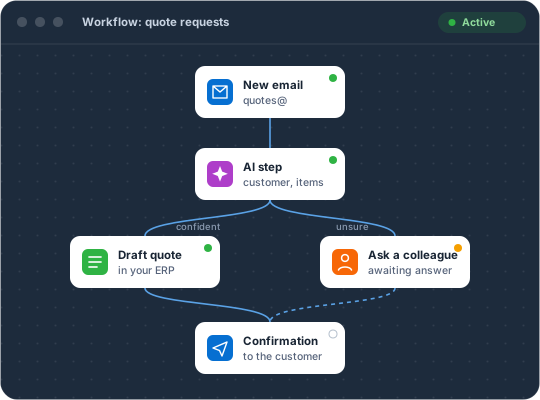
A workflow is a series of steps on a canvas. You see what happens, for every email and every quote.
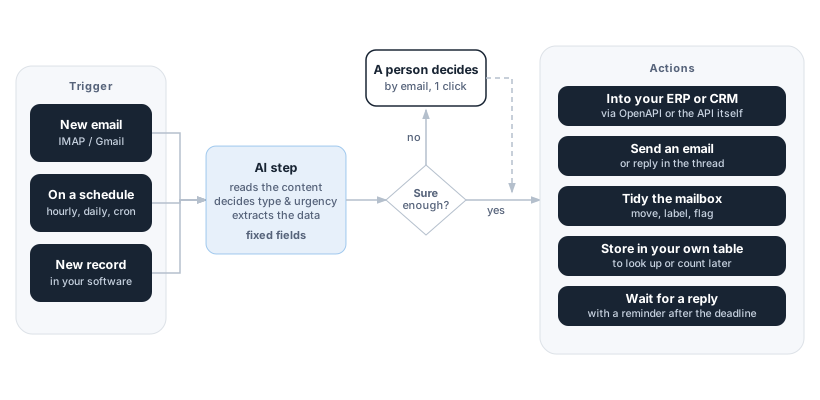
Something happens
An email comes in, it is Monday at nine, or a new quote request appears in your software. That is the starting signal.
AI and rules pick the route
The AI reads along and returns fixed fields: what is this, who is it from, how urgent is it. Your rules decide where it goes. When in doubt, a colleague gets the question.
The work gets done
Data goes into your systems, email goes out, the mailbox is updated. Every step can be looked back on, with what went in and what came out.
Where it usually starts
Most companies start with the mailbox. That is where the work comes in, and where most of the time goes.
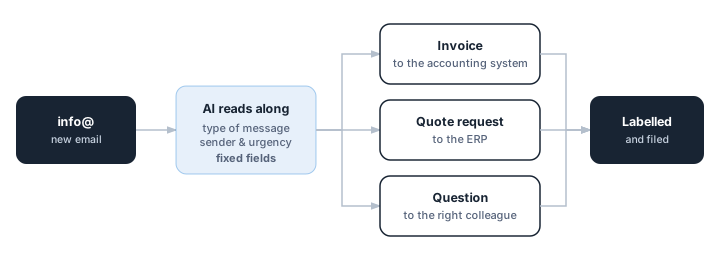
The shared mailbox that sorts itself
Every email in info@, quotes@ or invoices@ is read and sent to the right place. The mailbox stays tidy.
- Works with your existing IMAP mailbox or Gmail
- Replies are linked to the right conversation
- Move, label, flag and reply
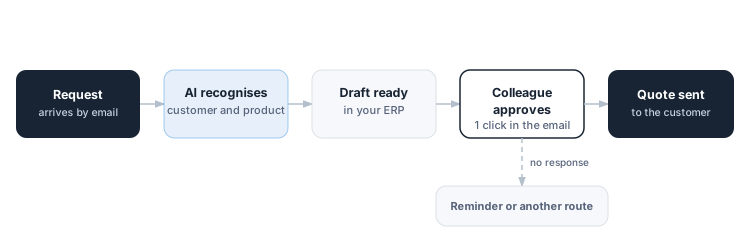
From request to quote, without retyping
The request is read and the draft is waiting in your ERP. A colleague only needs to approve it.
- Approve with one click from the email
- No response within the deadline? Another route takes over
- Connects to your software through its API
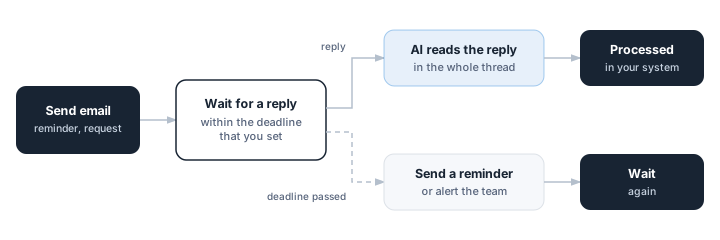
Follow-up that does not get forgotten
Waiting for a reply is a step in the workflow. When the reply arrives, it carries on. When it does not, the system notices in time.
- You set the deadline
- The reply is read in the context of the whole conversation
- Reminders only go out during the hours you choose
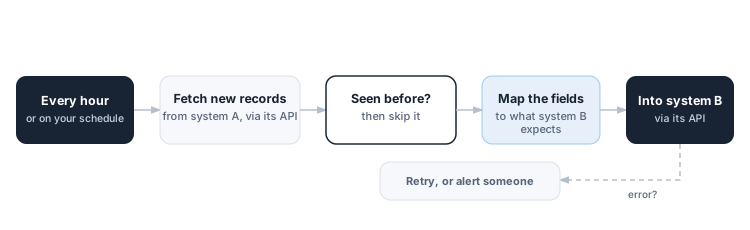
Two systems that keep each other up to date
Not everything starts with an email. Supertaak can also check on a schedule what is new in one system and pass it on to another.
- Hourly, daily or on your own schedule
- What has been processed is not picked up again
- If something fails, you see exactly at which step
What is inside
Not a single trick, but everything a process needs to run from start to finish.
A visual editor
You build a workflow as steps on a canvas, each step with its own form. Most of the work needs no code.
AI that returns fixed answers
You decide which fields the AI returns, and Supertaak checks them. Not a loose story, but data the next step can work with.
A person decides where it matters
A colleague gets the question by email and answers with one click. If no answer comes, the workflow takes another route on its own.
Time is a step
Wait for a reply, wait until a given moment, or only let things through during office hours. It is built in.
Your own tables
Keep data that fits in no other system, look it up later or add it up. Without setting up a separate database.
Every step on record
For each step you see whether it worked, what went in and what came out. A temporary error is retried automatically, and you can rerun a step yourself.
Does your software have an API? Then it works with Supertaak.
Most platforms hand you a list of integrations and hope yours is on it. Supertaak works the other way round: you provide the technical description of your software, and the integration follows from it.
OpenAPI and Swagger
The standard almost every modern package ships. Endpoints, fields and authentication are read straight from it.
Or just the API itself
No description available? An HTTP step calls the API directly. A little more work, same result.
Something new in your software? Something starts.
Supertaak can watch a system and start a workflow as soon as something new shows up, such as a quote request or a customer.
- IMAPany business mailbox
- SMTPsending email
- Gmailsign in with Google
AI
- OpenAI
- Google Gemini
- Mistral
- Ollamaon your own server
Business software
- BrincrERP for wholesalers
Any other API
- OpenAPI 3
- Swagger 2
- HTTP / RESTcalled directly
You choose where your data goes
Our servers are in the European Union. You choose which language model does the work: OpenAI, Google Gemini or Mistral, or a model on your own server through Ollama. In that last case the content of your email never has to leave your own environment.
Curious what Supertaak can do for your process?
In half an hour we show what is possible with your own email flow or integration. No sales pitch, just your situation on the table.